

Google would prefer you didn’t do this. The interface will warn you. The asset strength indicator will scold you. Every nudge in the Performance Max workflow is designed to push you toward supplying more creative, so Google can serve your ads across every surface it owns, whether or not it’s profitable: Search, Shopping, Display, YouTube, Gmail, Discover.
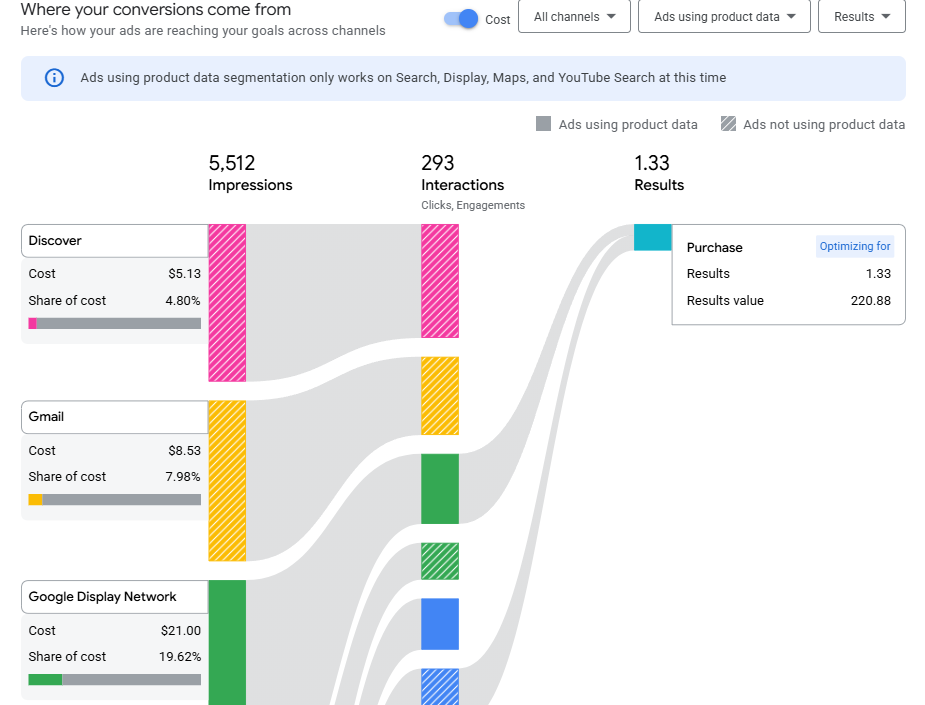
Why does Google want you to add every possible asset to a new Performance Max campaign? Google’s incentive is to maximize the inventory your budget touches. More placements mean more auction liquidity, and more ways for your dollars to flow into corners of the network you never intended to advertise on. When Google tells you your asset group is “limited,” it isn’t warning you out of true concern for your performance. It’s telling you it can’t fully spend as much as it thinks is appropriate.
A Feed-Only Performance Max campaign (also called “assetless PMax”) is exactly what it sounds like: a PMax campaign where you deliberately provide zero creative assets (beyond what you have in the product feed, that is!). No headlines, no descriptions, no images, no videos. The only input is Google Merchant Center. Without specific display creatives or videos to work with, the algorithm can’t generate Display banners or YouTube pre-rolls. What it can do is bid (relatively) intelligently on Shopping placements, using the product data you’ve already built.

The result is a campaign that behaves like a more automated, more aggressive version of a standard Shopping campaign, with algorithmic bidding and real-time audience signals concentrated on the product ads (where purchase intent is generally the highest). At StatBid, we’ve largely used it to replace traditional Shopping campaigns across most brands in our portfolio, running it alongside full-featured PMax as a standard part of every account structure.
Google doesn’t recommend this approach. We do.
Why Go Against Google’s Advice?
It’s worth elaborating on why Google discourages feed-only PMax, because the explanation reveals a genuine misalignment of incentives.
Google’s stated position is that Performance Max works best with access to the full range of creative assets and ad surfaces. From Google’s perspective, this is true: the algorithm performs best for Google when it can distribute your spend across the entire ad network, and spend as much of your allowed budget as possible. Moreover, Google struggles to sell all of the massive display and video inventory it can, because most of us know that those channels are often a lot less connected to conversions. They’re incentivized to allocate more of your spend to the parts of their ad network they ordinarily struggle to monetize at as high a rate as traditional Search/Shopping.
When you’re selling physical products online, a Display impression and a Shopping impression are not equivalent. The user who sees your product in a Shopping carousel is probably comparing prices and evaluating options. They’re in buying mode. The user who sees your banner on a recipe blog is doing something else entirely, probably not connected to the lower part of your shopping funnel. Both count as impressions. Only one consistently drives revenue.
Feed-only PMax campaigns, like traditional Shopping campaigns, are a bet that your budget is better spent on fewer, higher-intent ads rather than on broader, “algorithmically optimized” reach. In our experience managing ecommerce accounts across a range of industries and catalog sizes, that bet has generally paid off.
Where It Fits in the Campaign Architecture
Shopping-oriented campaign types exist on a spectrum of control versus reach, and every ecommerce advertiser has to decide where to sit. (I’m ignoring campaign types that don’t serve product shopping ads here!)
Full-featured Performance Max sits at the “more reach” end of the spectrum. You supply complete creative assets, audience signals, and product feeds, and Google distributes your budget across every property it operates. For advertisers with strong creative and an appetite for cross-channel discovery, this is a powerful tool. It’s also a campaign type that will happily spend quite a bit of your budget on Display and YouTube if you let it.
By contrast, Standard Shopping sits at the control end. Product-level bids, enforceable audience targeting, and a guarantee that every impression is a Shopping ad. The tradeoff is losing PMax’s algorithmic bidding and its ability to react to real-time signals at the auction level.
Feed-only PMax occupies the middle ground. You get PMax’s smart bidding without surrendering your budget to placements you didn’t request. Ninety percent or more of impressions land on Shopping ads. Your product feed does all of the creative work.
This is why we’ve generally replaced Standard Shopping with feed-only PMax on most of our accounts. It gives us almost everything Shopping gave us, plus the bidding intelligence Shopping lacks, without the budget leakage that comes with running full creative.
How We Actually Use It
In our standard account builds, feed-only PMax campaigns serve as the primary non-brand Shopping engine.
The campaigns usually start by running broad: all products, tROAS bidding aligned to the client’s cost-of-sale target. It handles the catalog’s long tail, the hundreds or thousands of products that individually don’t warrant dedicated attention but collectively drive meaningful revenue.

Over time, we split this out into multiple feed-only campaigns. The trigger is almost always divergent performance: a handful of high-volume products start absorbing most of the bidder’s attention, drowning out the rest of the catalog. The algorithm is optimizing correctly from its own perspective (it’s chasing the easiest conversions), but the result is that large swaths of the product catalog are effectively starved of spend. When we see that pattern, we segment. That’s often by intent group or product type, but we might also layer in velocity grouping, profitability tiers, audience targeting, or other dimensions depending on what the data is telling us. The goal is to give the bidder a more uniform population of products to optimize within each campaign, so it can’t just default to the proven winners at the expense of everything else.
Alongside them, we run full-featured PMax campaigns with complete asset groups organized by individual products, or product collections or categories. These target hero products with headlines, images, audience signals, and cross-channel reach focused on the categories where that investment makes sense.
The two campaign types overlap intentionally. Both may be eligible for the same product auction. In practice, the campaign with the more permissive target tends to absorb more volume, and we typically set a slightly more aggressive target (lower ROAS) for the feed-only campaigns than for the full-featured ones. That means the feed-only campaign captures the broad, efficient Shopping volume, while the full-featured campaign competes more selectively on its hero products where the creative investment justifies a tighter return threshold. We manage the balance through careful attention to budgets rather than listing group exclusions, which gives both campaigns room to find their natural equilibrium.
Underneath both, for some accounts, we’ll still run a Manual CPC Shopping campaign as a low-bid catch-all, picking up impressions on products that neither PMax campaign group prioritizes. It’s insurance, not a primary revenue driver, but it ensures nothing in the catalog goes completely dark.
Each layer has a distinct role. Feed-only PMax earns its position as the required foundation because it delivers the most consistent Shopping coverage with the least overhead. No creative to produce or manage, no cross-channel budget to police. Just the product feed and the algorithm, pointed at Shopping.
Why It (Mostly) Replaced Standard Shopping For Us
When StatBid first started testing feed-only PMax against Standard Shopping on the same accounts, we expected tradeoffs. We got a clear winner instead.
The PMax campaigns showed superior reach across the product catalog. More products received meaningful impression volume, and the campaigns adapted more quickly to shifts in customer behavior: seasonal changes, trending products, price sensitivity shifts. Standard Shopping, with its manual or portfolio-level bidding, simply couldn’t react at the same speed.
Just as importantly, feed-only PMax required far less hands-on audience management. Standard Shopping campaigns (if not using automated bidding) need ongoing attention to bid adjustments, product group restructuring, and audience layering. Feed-only PMax handles most of that algorithmically. The efficiency numbers stayed comparable, which meant we were getting more volume with less work at the same return on ad spend. That’s a rare combination in paid search, and let us dedicate our time to other aspects of growing accounts.

We didn’t abandon Standard Shopping entirely. It still has a role as a catch-all backstop and in specific situations where product-level bid control is non-negotiable. But as the primary Shopping engine, feed-only PMax proved itself the better tool, and that’s now reflected in how we build every new account.
Setting It Up (And Ignoring the Warnings)
The setup is simple, but it’s deliberately designed to feel wrong.
Create a Performance Max campaign with your standard settings: tROAS bidding, a budget benchmarked to existing Shopping spend, correct location targeting, and a naming convention that signals the campaign’s intent. Then create an asset group, select “Use URLs from your feed” for the Final URL setting, and leave every creative field blank. No images. No logos. No headlines. No descriptions. Nothing.

Google will protest. Multiple warning banners will appear. The interface will insist you’re making a mistake. Ignore all of it. Those warnings exist because Google wants access to more of its ad inventory, not because your campaign won’t work. The asset group will save with a “Limited” status, which is exactly the status you want. It confirms Google can’t serve your budget beyond Shopping.
You can optionally add audience signals (website visitor lists, customer match data, in-market segments) to give the algorithm directional guidance during the learning period. If you want to use audience signals, do it during campaign creation- the UI won’t allow it after-the-fact. But the creative side stays empty. That’s the whole strategy.
What Can Go Wrong
Feed-only PMax is reliable, but it requires vigilance in a few specific areas.
Google may auto-generate assets without your permission. This is the single most important risk. Even with no assets provided, Google can pull images and text from your website or product feed and attach them to your asset group (if your account, campaign, or “auto-apply” settings are mis-configured). Once that happens, the campaign starts serving on Display and YouTube, and your budget leaks into placements you never approved. Usually, you can remove auto-generated assets in the asset view, but this can be time-consuming and prone to failures. Check for this regularly. If your asset group status changes from “Limited” to “Eligible,” investigate immediately.
Oversized budgets invite channel expansion. If your daily budget exceeds what Shopping placements can absorb, Google will spend the surplus elsewhere. Size your budget based on actual Shopping capacity, not aspirational targets.
Aggressive bidding targets have the same effect. An unrealistic tROAS or extremely low tCPA can push the algorithm to “take risks” outside Shopping. Keep targets grounded in actual Shopping performance.
The seal isn’t perfect. Even a well-configured feed-only campaign may bleed a small percentage of traffic to non-Shopping placements. When this tactic first emerged, feed-only PMax delivered 95%+ Shopping serving with impressive consistency. We’ve since observed more variability. If you need an absolute guarantee of Shopping-only serving, Standard Shopping remains the only option. For most accounts, the minor leakage is an acceptable tradeoff for the bidding intelligence you gain.
When It’s Not the Right Call
Feed-only PMax has clear boundaries. It doesn’t work for service businesses without product feeds, and we’ve seen it struggle for very small catalogs, like the kind often managed by direct-to-consumer brands. It’s not the primary choice when a brand has strong creative and genuinely wants multi-channel reach, and it’s poorly suited to brand awareness objectives. Shopping is a bottom-funnel format; if you need specific messaging across multiple channels, look elsewhere.
The Quiet Workhorse
Google Ads rewards complexity. New features, new campaign types, new automation layers: there’s always something shiny to chase. Feed-only PMax is the opposite of shiny. You build it by leaving fields blank and dismissing warnings. It doesn’t promise to unlock hidden audiences or revolutionize your marketing mix.
What it does is deliver consistent Shopping coverage with smart bidding, minimal overhead, and real budget control, in a platform where the operator’s incentives and the platform’s incentives don’t always point in the same direction. We’ve used it to replace 70%+ of traditional Shopping across our portfolio, we run it on nearly every account, and it earns its place month after month.
Sometimes the best move in Google Ads is to give the platform less than it asks for.


Andrew Flicker is the VP of Operations at StatBid. With 18 years in ecommerce, his work has focused on marketing, pricing, merchandising, product content, and using large, imperfect datasets to solve practical problems - from organizing catalogs and positioning inventory to optimizing paid channels for maximum profit and efficiency. Andrew brings an operator’s mindset to StatBid, grounded in disciplined measurement, durable systems, and turning complex problems into actions merchants and marketers can actually execute.