
Merchant Center is flagging missing GTINs. Or you want custom labels for campaign segmentation, a deeper product type tree, maybe a material attribute so your products match more searches – and none of it lives anywhere your feed can reach. Often the data technically exists in Shopify, barfed into Tags or buried in description text, in no shape Merchant Center can use. The feed wants a field your store has never provided.
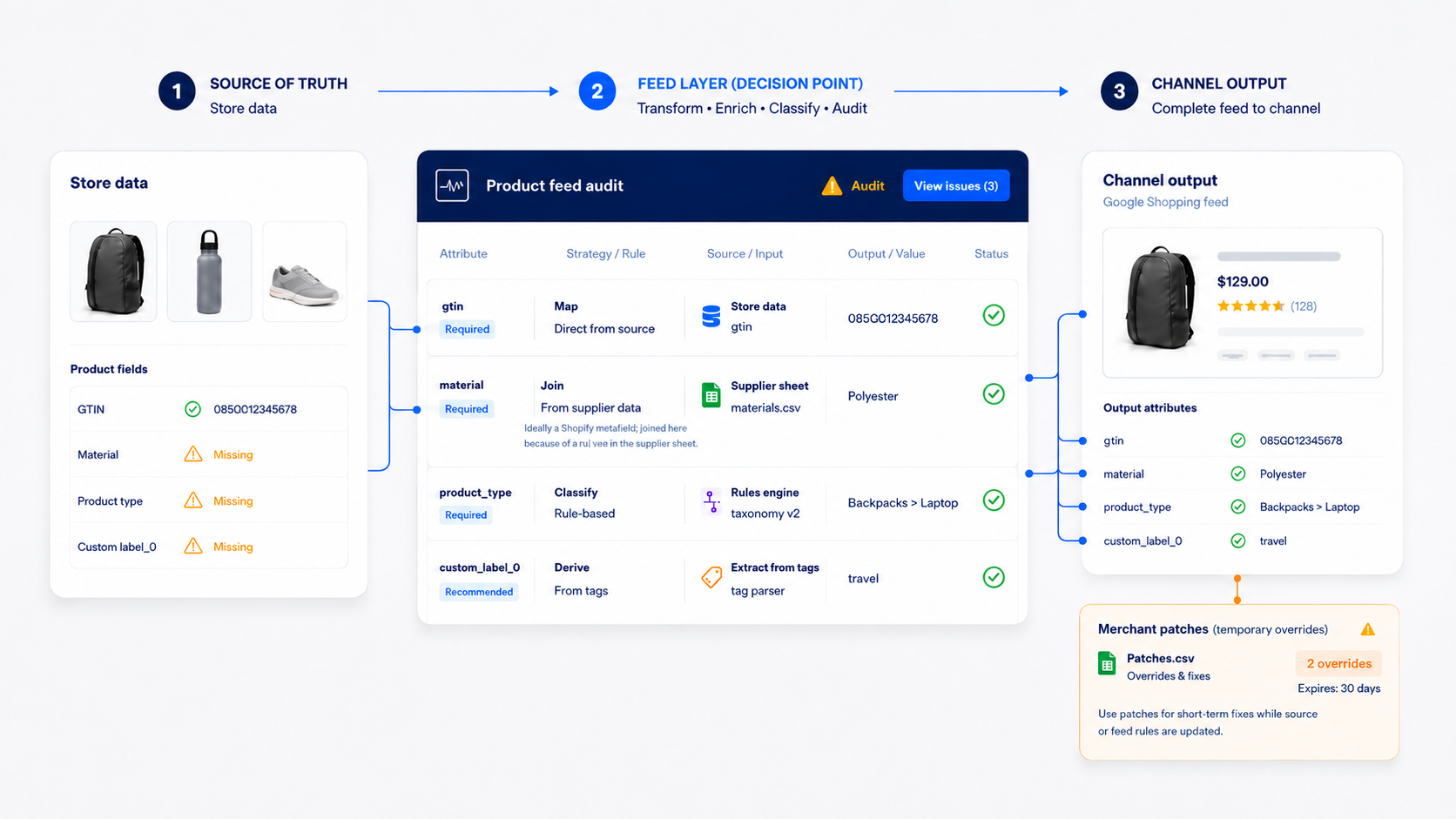
Most advice treats this as a tooling question: install this app, connect that sheet, done. We treat it as a decision about where data should live. There are three places you can add missing product data – at the source in Shopify, in the feed layer between Shopify and Merchant Center, or patched in at the destination inside Merchant Center – and each one has a different cost attached, usually due about twelve months later. Pick by whatever is fastest today and the bill tends to arrive as stale data nobody remembers creating.
Three Different Problems That Look the Same
“The data isn’t in my feed” actually describes three situations, and it’s worth knowing which one you have.
Sometimes the data exists, just not in Shopify. GTINs are sitting in a supplier spreadsheet. Materials live in your ERP, or in the brand’s spec sheets. That work is a join: match the existing values to the right products and get them into the feed.
Sometimes the data exists in Shopify but in a form no feed mechanism can use cleanly. Tags are the classic case: years of attribute data crammed into a flat tag list (“polarized”, “mens”, “clearance”, “blue”) with no structure telling a feed tool which tag is a color, which is a gender, and which is a leftover from a 2022 promotion. The work there is extraction: turn unstructured tags and text into named attributes.
Other times the data doesn’t exist anywhere yet. Nobody has ever classified your products by coverage level, strap style, or compatible device, so someone (a person, or these days a model with a person checking it) has to create those values before any tool can carry them. Classification first, then the join.
All three versions end at the same question: where should the new data enter the pipeline? That choice matters more than which tool you buy.
The Rule We Use
Fix data at the source when it’s a permanent truth about the product. GTINs, materials, dimensions, real categories – these belong in Shopify, as product fields or metafields, because everything benefits. Your storefront can filter on them, marketplaces and Meta can consume them, and the Shopping feed picks them up on the way through. Data fixed at the source gets seen, used, and corrected. A downstream patch is only ever as healthy as the patch.
Use the feed layer for channel-specific work. A five-level product type tree, expanded titles built for query matching, a derived product_detail field – this stuff exists to make Google’s auction work harder for you, and it doesn’t belong in your storefront data. Push it back into Shopify and you’ve cluttered the catalog with values shoppers were never meant to see on the page.
Use Merchant Center patches for reversible tests and light joins. Manual edits inside Merchant Center are a last resort – an edit made there is invisible to everything upstream of it, and Merchant Center treats item-level edits as the most specific information it has, so the edit wins over every later feed update until someone remembers to remove it.
And whatever you pick, write it down. Every field that lands in Merchant Center should have a known origin and a known owner. We keep a feed structure doc for every client that records exactly that, field by field, because the alternative is a catalog that drifts and nobody can say why.
Shopify Metafields, for Things That Are True About the Product
Shopify’s standard product fields only carry so much, and metafields are the native way to extend them: define an attribute (brush type, coverage level, frame material), attach it to a product category, fill in values per product. With the Search & Discovery app those same metafields become storefront filters, which doubles as a decent test of whether the attribute is a permanent truth. If a shopper would filter by it, it belongs at the source. This is also the right destination for the tag-extraction work above: once you’ve pulled “polarized” out of the tag soup, a structured metafield is where it should live.
The catch: metafields don’t reach your feed on their own. They have to be mapped by whatever feed mechanism you’re using, and this is where Shopify’s native option runs out of road. The Google & YouTube app is a great starting place, and for a small catalog of standard products it might be all you need. It covers the core fields and not much more – the optional and custom attributes are exactly where it gets unreliable, and those are the fields this whole article is about.
The Feed Layer, Where the Channel-Specific Work Goes
For most growing catalogs the long-term answer is a dedicated product data tool sitting between Shopify and your channels: import from Shopify and your other sources, add and transform fields, export a tailored feed to each destination. This is where the supplier-spreadsheet join belongs, where product type trees get built, where titles get expanded for matching – and where one clean catalog becomes a Google feed, a Microsoft feed, and a Meta feed without three separate maintenance jobs.
Today we run this layer for clients in dedicated third-party feed platforms like Feedonomics and ProductsUp. They’re capable, but they’re built for feed specialists more than operators, and in practice the complexity becomes its own maintenance cost – which is why we’re building our own product data tool to eventually take their place. Whatever tool sits in this layer, the test we’d apply is the same: can someone who isn’t a feed specialist look at it and tell where each field comes from?
One of our clients, a printer-supplies retailer, is a good picture of what this layer can do that no storefront ever could. Their feed, running through one of those third-party platforms, replicates each parent product into up to twenty variants based on compatible printer models, so a single cartridge can show up for a lot of different printer-specific searches. None of that structure exists in the store’s backend, and none of it should – it’s pure feed-layer work, documented field by field.
Merchant Center Patches: Handy and Easy to Abuse
Merchant Center accepts supplemental data sources – a secondary feed, very often just a Google Sheet, joined to your primary feed by item id. The id match is exact and case-sensitive. An id mismatch is the most common reason a supplemental source does nothing, and the error that does get logged is buried in the data source details, where nobody thinks to look.
We use this layer constantly for two things. First, reversible tests. When we test improved titles, we load a two-column sheet (id and the test title) as a supplemental source. It overrides the primary feed while connected, and pulling the sheet reverts everything. The reversibility is the whole point – you don’t want a title experiment burned into your storefront data.
Second, enrichment that derives new attributes from data already in the feed. We run a process that classifies products from signals in existing titles, descriptions, and color fields, then assembles the results into the product_detail attribute with formulas in a connected sheet. Better classification, more for the bidding systems to segment on, and the sheet itself is the documented source, so it stays maintainable.
What we avoid here is the permanent patch: the supplemental feed that was supposed to be temporary, the manual edit someone made in the interface during a fire drill. In all our years of feed work, we know of exactly one case where a direct edit in Merchant Center was unavoidable: a product image that had to be uploaded straight into GMC. Everything else has had a better home.
How Patches Become Outages
An undocumented supplemental feed is an outage you’ve scheduled for yourself. The data goes stale the moment the catalog changes, and since nobody remembers the feed exists, the symptoms surface months later as wrong titles, dead custom labels, or attribute values that contradict the site. If a patch is worth making, it’s worth a line in the feed doc: what it provides, where it lives, who owns it.
Two mechanical traps worth knowing about. Once a supplemental source is connected, Merchant Center’s default rule will generally prefer its data over the primary feed – and that same rule blocks you from deleting the source until you remove it from the rule, which surprises people in both directions. Also, never let two primary sources cover the same item ids. Merchant Center will just pick one, the selection logic isn’t transparent, and the fix is one primary plus supplemental sources, never overlapping primaries.
Where the Data Enters Decides Who Notices When It Breaks
A product feed is a supply chain, and missing-data decisions are inventory decisions. A permanent truth in Shopify gets used and kept honest by the whole business. Channel work in the feed layer is powerful and flexible, with one documented home. A patch in Merchant Center is something only one system can see – fine for a test, dangerous as a habit. Handling this well takes less tooling than it takes bookkeeping. The merchants who do it best can tell you, for every field in their feed, where it comes from and who owns it.