
If you’ve ever opened Google’s product data specification, you know there are dozens of fields you could be filling in, and nobody has time for all of them. So which ones actually move Shopping performance?
Google sorts the spec into required, required-in-some-cases, and optional. That’s a useful answer to a different question. It tells you what Merchant Center needs before it will list your products, and that’s all it tells you. Some of the highest-leverage fields in the feed are labeled optional. product_type is optional and we treat it as close to essential. google_product_category is required and we leave it blank most of the time and let Google fill it in. Set your priorities by the spec’s labels and you’ll polish fields that barely matter while skipping the ones that decide which searches you show up for.
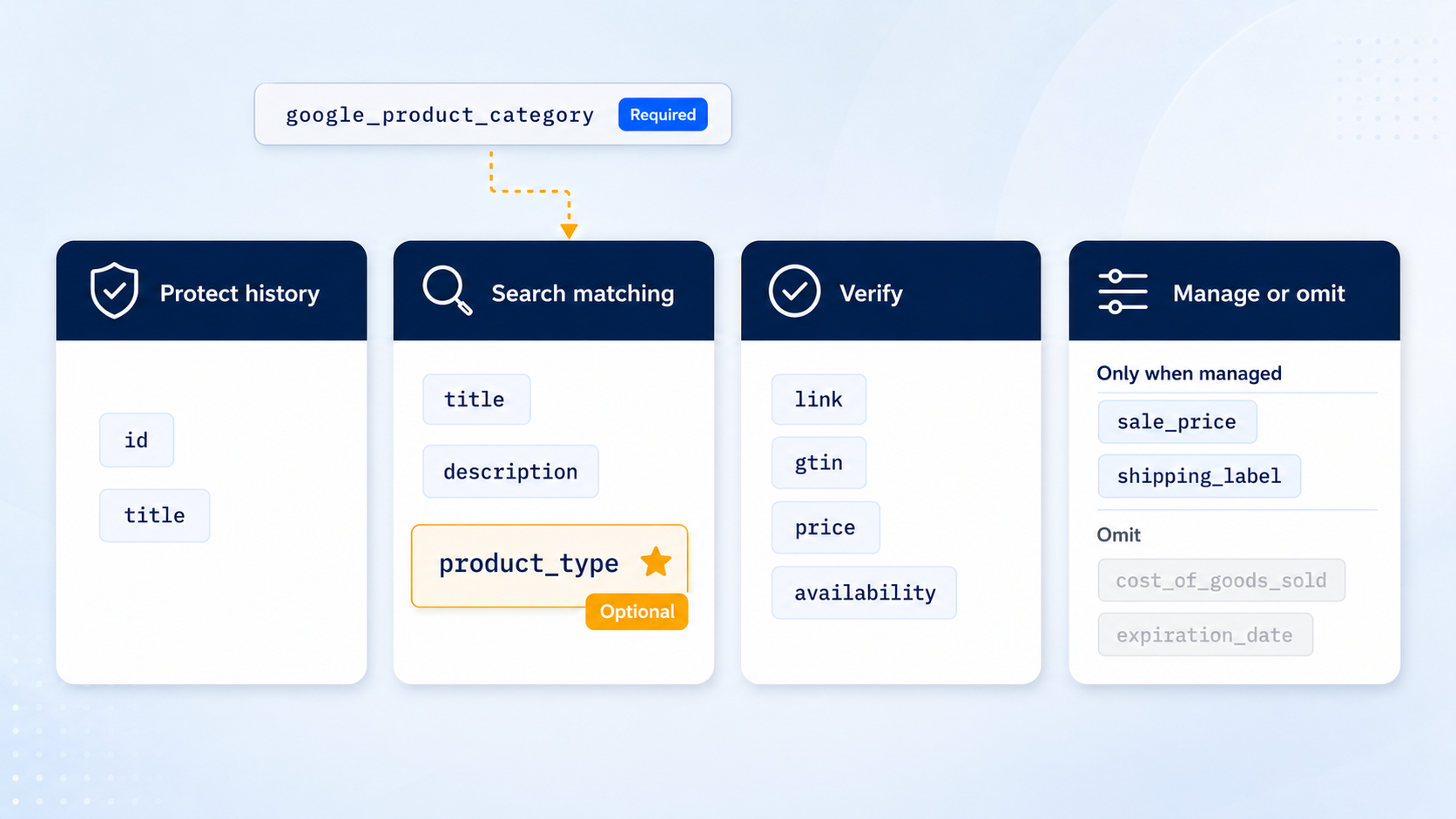
We sort fields into four buckets instead: the ones that carry your performance history (don’t break these), the ones that decide which searches you compete for (spend your time here), the ones that get items disapproved when they’re wrong (verify and move on), and a short list we deliberately don’t send.
The Fields You Should Be Afraid To Touch
Every item in your feed builds up performance history that bidding systems lean on to decide when to show it and how to bid. Two fields anchor that history: id and title.
Change an item’s id and the history is gone. Google treats it as a brand-new item- no record of what it matched, what it converted on, nothing. The field is case-sensitive too, so “SKU123” to “sku123” is a new item as far as Merchant Center is concerned. We only change ids when we have no other choice.
Platform migrations are where this bites people. Shopify’s default ids are Shopify-specific, so migrating to or from Shopify changes every id in the feed, which resets the whole catalog’s history at once. When we handle a migration we do whatever we can to keep the id stable as Merchant Center sees it- usually mapping SKU or another stable identifier into the id field, or exporting the old id list beforehand and feeding it back as an override. A few hours of mapping work protects months of accumulated performance.
Titles are nearly as sensitive. The title combines with the id to identify the item in Merchant Center’s records, so title changes can reset performance data too, and you can watch it happen: in our title tests, the test group usually dips for the first couple of weeks and then recovers. A clean read takes two months, sometimes four. Titles are absolutely worth improving (more on that below), just batch your changes rather than editing titles every time someone has an idea.
The Fields That Decide Which Searches You Compete For
Shopping has no keywords. Your feed is the keyword list, and three fields do most of the matching work.
Title is the big one. You get 150 characters and we generally want to use most of them, even though shoppers only see the first dozen or so words, because the whole field is available for matching. Put the words a shopper would use to recognize the product up front, match brand and product line spelling exactly to the site, and use general color names (“light blue”, not “winter’s breath”).
One thing we learned from our own testing in 2025 that cuts against the standard advice: always including size in titles can shrink the impression pool for standard-size variants. Someone who wants a medium searches “t-shirt”; someone who needs XXXL puts the size in the search. So we stopped proactively adding size for standard-range variants and kept it for the outlier sizes people actually search by. A lot of “universal” title guidance is testable, and some of it will turn out to be wrong for your catalog.
Descriptions never show in the ad itself, but Google matches against them at auction time and they can appear on the Shopping tab. That’s 5,000 characters to cover the vocabulary your title can’t fit. Keep it accurate and readable, since shoppers can end up seeing it.
Then there’s product_type, the optional field this article is named for. It’s your own categorization of your catalog, and it does three jobs at once: it gives you product groups to structure campaigns and bids around, it adds keyword-match real estate beyond the title, and it cues bidding systems about which items are likely to behave like each other. In our experience it gets used for matching less than title but more than most other fields, including description. A good tree covers everything in the feed, goes at least three levels deep on most items, and uses words consumers actually search.
This is also where we’ve seen the clearest wins. An apparel client had items with thin product data sitting at zero clicks; classifying them with color, product type, and material gave the auction something to match on, and some of those items went from zero to hundreds of clicks per week. An eyewear client got a significant volume bump from repeating key search terms like “polarized” in the product type tree. Across clients, search-term-optimized product types have improved volume by something like 10% versus leaving the field blank- sometimes with small drops in average CPC as well, which is a nice bonus. We have more evidence about going from blank to populated than from mediocre to great, but by induction we think the value extends there too. If you only do one feed project this quarter, build the tree.
For spec-heavy catalogs, product_detail extends the same idea: structured attributes that feed Shopping tab filters and give the auction more ways to subdivide your products.
The Fields That Get You Disapproved
Most of the remaining fields won’t earn you anything extra when polished. They just take items off the shelf when they’re wrong. This is verification work, and it lives in Merchant Center diagnostics rather than your performance reports.
The link has to land on the exact variant in the ad, size and color preselected, because Google crawls it to confirm the price and availability on the page match the feed. Links that resolve to the parent product cause mismatch disapprovals that look like price errors and aren’t. Keep an eye on robots.txt while you’re at it- a crawl-blocking change starts disapproving a handful of items and cascades to most of the feed within a few days. That one is a same-week fix, every time.
gtin surprises people: it’s better absent than wrong. GTINs are registered identifiers with a strict format, and a malformed one gets the item disapproved outright. When a client’s GTIN data is unreliable we just remove it, and we lean on mpn to keep a reference back to their own identifiers.
google_product_category is required and we leave it blank anyway. Google’s auto-fill does a fair job on mainstream consumer products. Where it gets weird is non-standard catalogs- industrial goods, B2B products, things Google has seen less of. Either way, you check after the feed passes through Merchant Center, because that’s when you can see what Google actually assigned (we run this as a Feed QA step in Argos, our internal tooling). Hand-setting the category on every item before submission is mostly wasted effort at this point.
The rest of this bucket is variant hygiene: item_group_id so variants group under a parent, plus color, size, and material filled in consistently so the right variant serves for the right search. Price and availability just have to match the site. The crawler will check whether you like it or not.
The Fields We Deliberately Don’t Send
Two fields we withhold outright.
cost_of_goods_sold hands Google your unit costs in exchange for some margin-ish reporting inside Google’s own interfaces. We’d rather track product-level profitability on the merchant’s side of the fence, where the data informs your decisions without also informing the auction’s owner.
expiration_date tells Merchant Center when to drop an item from the feed. In practice it mostly creates mysteries: an item vanishes on a date someone set months ago, and nothing in the current reports tells you why. Availability handles the same need without the time bomb.
Then there’s a second group that’s fine to send only while someone is actively managing it, because these fields override settings configured elsewhere. sale_price is the obvious one. Per Google’s spec, a sale price submitted without sale_price_effective_date applies for as long as the value is present, so a column that keeps populating after the promotion ends becomes the price Google shows and checks against your site. Google also validates the discount against your base price history before it will show a sale annotation. Stale values buy you mismatch disapprovals, not extra sales. Send it during real sales, with dates, and drop it the rest of the time.
The shipping attribute works the same way: feed-level shipping overrides your account-level shipping settings, and Google’s own guidance says to treat it as a last resort for exceptions like oversized or fragile items. If the column exists because a feed template put it there, it’s outvoting the settings someone actually maintains. Same with shipping_label values that no account-level service references: data that controls nothing is just one more thing to keep accurate.
This list will probably grow. Our general rule: if a field’s main effect is giving the platform data it wants, or overriding a setting nobody meant to override, it has to earn its column.
Where To Spend Your Next Feed Hour
Work the buckets in order. Make sure nothing is churning your ids or rewriting your titles, especially after a platform, theme, or feed app change- stability there protects everything else. Then clear whatever diagnostics is flagging, starting with anything that cascades, like crawl errors. Then put everything left into the matching fields, starting with the product type tree, because it pays three ways at once.
The feed is where your catalog meets every dollar you spend on Shopping. Google’s labels tell you what’s required to be listed. What’s required to compete is a different list, and most of it is “optional.”