
You’ve been running one or two generalist Google Ads campaigns for a while, maybe a Shopping campaign and a Search campaign, or a single Performance Max campaign that’s grown into the catch-all. The business is bigger now. The catalog is growing. You’re ready to branch out into more campaigns: brand search, category search, dedicated PMax for specific product lines, maybe a remarketing campaign.
So you click into Google Ads to set up your next campaign. Immediately you’re in a fight you didn’t sign up for.
The interface keeps recommending things. Bigger budgets. Broader targeting. Search Partners enabled. Display Network expansion. Automated bidding without explicit goals. “Recommended” settings highlighted in helpful blue. Accept them, and your spend goes up while your performance goes somewhere harder to read.
The defaults aren’t neutral. Most of them push you toward outcomes that benefit Google’s revenue more than yours, and the interface has gotten more aggressive about this over the last few years. Knowing which defaults to accept, which to question, and which to flat-out change is most of what separates a campaign that grows the account from a campaign that just grows the spend.
How the Defaults Work for Google
In interface design there’s a well-documented concept called dark patterns: design choices that nudge users toward decisions that benefit the platform at the user’s expense. The term was coined by UX researcher Harry Brignull and now has its own taxonomy at deceptive.design. Classic examples include pre-checked opt-out boxes, hidden subscriptions, fake urgency banners, and roach-motel signup flows that are easy to enter and hard to leave.
Google Ads has its own version of this built into the campaign creation flow. The defaults consistently push advertisers toward broader targeting, more inventory, looser bidding, and bigger budgets. Those are the settings that maximize Google’s auction revenue. The campaigns that result from accepting them tend to spend more and perform worse than campaigns where the defaults got questioned.
Treat this as a recognition rather than a complaint. The interface has a built-in interest that often diverges from the advertiser’s. The job of an experienced operator is to know where the divergence lives. The list below is where we change settings every time we create a new campaign on a maturing account.
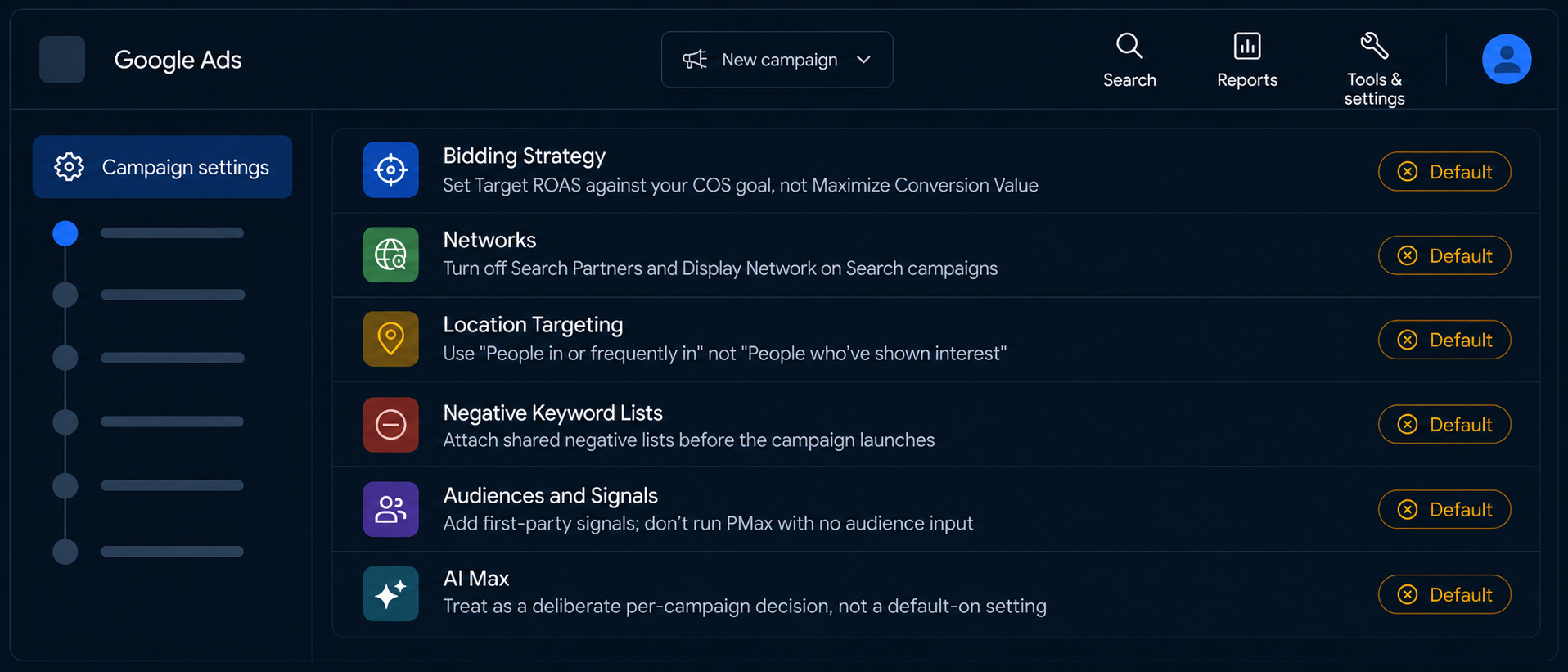
Six Settings Worth Pushing Back On
The same six settings come up every time we set up a new campaign. The defaults are wrong on all of them, and the cost of accepting them compounds as the account grows.
Bidding Strategy
This is where Google’s interface gets the pushiest. The bidding options change frequently, the default keeps tilting toward more automated and less explicit options, and the difference between an explicit goal and no goal is the difference between an algorithm optimizing for your business and an algorithm optimizing for spend.
Our default for non-brand campaigns is Target ROAS, with the target set against the account’s COS goal. The algorithm uses real-time auction signals (device, query, audience, time of day, predicted conversion value) to bid each auction. Automated bidding’s responsiveness to those signals will outperform any manual approach an analyst can sustain at scale.
What we push back on:
Maximize Conversion Value without a target ROAS. This is the smart-bidding strategy that chases volume regardless of efficiency. It’s an acceptable launching pad on a brand-new campaign with a tight budget cap (the algorithm needs conversion history before it can hold a stable target), but the moment you have a handful of conversions, switch to Target ROAS. Letting the campaign run on Maximize Conversion Value indefinitely is one of the more common ways accounts overspend without anyone noticing.
Manual CPC on a maturing account. Manual bidding has its uses. Traditional Search or Shopping campaigns where the operator has a clear view of the CPC range that produces the right ROAS or impression share, and where the bid is stable enough that smart bidding’s adjustments would actively mistarget. On a maturing account with 15+ conversions per month, automated bidding will outperform.
Accepting Google’s recommended target. Set the target from your business goal: the account’s COS commitment, your contribution-margin floor, whatever you actually run the business against. Google’s recommended targets tend toward looser efficiency than the COS goal supports, because looser efficiency means more spend.
Networks: Search Partners and the Display Network
Both are enabled by default on Search campaigns. On a standard Search campaign, both should be off.
Search Partners lets Google serve your ads on third-party sites that host a Google-powered search box. Some of those sites are legitimate publishers. Many of them are made-for-advertising (MFA) domains and content farms: sites that exist primarily to monetize ad clicks, with thin content, AI-generated articles, and suspicious branding. We’ve audited Search Partner placements on accounts where 30 to 40% of placements by impression volume classified as MFA or content farm.
One hearing care client we manage discovered this directly when a lead complained about being served a misleading “tinnitus trial that pays up to $5,000” ad alongside what looked like the client’s branding. Investigation traced the issue to Search Partner placements on a low-quality third-party site. The fix was network-level: disable Search Partners, audit the recent placement report, and add several hundred MFA domains to the placement exclusion list. The ad itself was working as intended; the network setting was the source of the issue.
The Display Network on a Search campaign is even worse. It extends spend into low-intent display impressions across the Google Display Network, which produces cheap clicks that don’t convert and a long tail of low-quality placements that inflate the reported spend.
What we keep on: Search Partners and Display can be the right call when the campaign is deliberately structured around them. A Performance Max campaign aiming at upper-funnel brand building. A Demand Gen campaign for remarketing. A Display campaign with curated placements. For a standard Search or Shopping campaign, they should be off, and the default behavior of leaving them on is one of the cleanest examples of an interface choice that costs advertisers money.
Location Targeting
Google’s default location option is “Presence or interest: People in, regularly in, or who’ve shown interest in your targeted locations.” This setting leaks budget toward people who have “shown interest” in your locations but will never buy from you: the looky-loos, people doing research from anywhere on Earth, and a long tail of bot traffic.
The opposite extreme is also wrong. Selecting only “Presence: People in your targeted locations” excludes workplace shoppers who’ll later purchase from home in a different ZIP, vacation shoppers who’ll convert when they’re back home, and the legitimate share of people who travel through your service area.
The setting we use is “Presence: People in or frequently in your targeted locations.” This captures the people who actually live or work near the location and leaves the global onlookers to other advertisers. Google buries this option inside the location settings panel, and the default and the recommendation both point elsewhere.
Negative Keyword Lists
Negative keyword lists belong on the campaign before it launches. The interface won’t help you remember.
When you create a new Search campaign, Google offers no prompt to attach a negative keyword list. The campaign launches with no negation protection at all, and the interface has nothing to flag that this is a problem. Over 99% of campaigns we manage need negative keyword lists to function correctly, and on mature accounts those lists run to several hundred or several thousand keywords. Google will eventually suggest negatives, weeks or months after the campaign has burned spend on irrelevant queries, by which point the damage has been done and the data has been polluted.
What we set: shared negative keyword lists, applied at the campaign level, before any campaign launches. The lists are organized by purpose (brand defense, category exclusions, irrelevant intent, MFA-adjacent terms). The interface won’t help you with this. The discipline has to live in the campaign-creation checklist itself.
Audiences and Signals
Audience targeting is its own surface area, but the default behavior across campaign types is worth pushing back on.
On a standard non-brand Search campaign, Google will run with no audience signals attached. That’s often fine for keyword-intent campaigns where the search query itself is doing the targeting work. On Performance Max and Demand Gen, audience signals carry much more weight. PMax in particular will go where the audience signals point it, and if the signals point at broad in-market audiences and generic affinity segments, the campaign will burn budget on low-intent users while looking technically active.
We attach first-party audience signals (customer lists, segmented site visitors, remarketing pools) to give the algorithm something useful to optimize against. Google’s defaults steer toward broader audiences because broader audiences spend more, and the signals you provide are the most direct lever you have to keep PMax from drifting toward the cheapest available impressions.
AI Max and the “Let Google Handle It” Settings
AI Max is a relatively new layer on Google Search campaigns that lets Google’s AI rewrite ad text, expand keyword matching beyond what you’ve specified, and customize landing pages on the fly. It’s enabled by default on new Search campaigns in some markets.
When it works, it can help. When it goes sideways, it can rewrite your brand voice into something you wouldn’t approve, broaden your matching into queries you’ve spent years negating, or generate ad copy that triggers policy disapprovals. We treat AI Max as a deliberate per-campaign decision. When we enable it, we set guardrails: text guidelines that exclude regulated-category language (especially on healthcare or financial services accounts), tighter asset combinations, and active monitoring of the search terms report for matching drift.
The pattern across AI Max and adjacent “let Google handle it” settings (automated final URLs, dynamic ad customization, ad rotation set to optimize) is the same. Default-on, easy to ignore, sometimes appropriate on the right account, dangerous on the wrong one. Worth a deliberate decision rather than acceptance.
Two More Guardrails at Launch
Beyond the six settings above, two campaign-level guardrails are worth installing at launch. Both are launch-time hygiene rather than pushback against a Google default. The launch is the moment when something subtle in the setup is most likely to be wrong, and these reduce the cost when something is.
Start the Budget Small
When we launch a new campaign, we usually start with a daily budget in the $20 to $50 range, even on accounts that will ultimately spend orders of magnitude more. The reason is risk management. The accounts in question have plenty of headroom and will spend it once the campaign is proven. The launch is when a missed setting, a missing negative list, an audience signal misconfigured, or an unexpected matching behavior is most likely to surface. A small launch budget acts as a guardrail against that subtle wrongness blowing through a week of spend before anyone notices.
After a few days of clean data, we raise the budget to its real operating level. The launch budget is a safety mechanism, separate from the campaign’s actual operating range.
Be Deliberate About the Campaign Objective
Google’s campaign creation flow opens with a choice of campaign objectives (Sales, Leads, Website Traffic, Brand Awareness, and so on). Each objective presets a different bundle of recommended settings under the hood, often before you see them. For most ecommerce campaigns, we use the “Create a campaign without a goal’s guidance” option specifically to bypass those presets. The objective-driven flow nudges toward broader targeting and looser bidding through preselection; the goal-less flow lets us configure each setting from scratch.
This is a small move that gives you a clean slate of settings to configure deliberately.
What This Means for the Merchant
Most of these defaults are easy to miss, and some of them are deliberately easy to miss. The campaign creation interface in Google Ads has been built to maximize the platform’s revenue, and that’s a built-in interest the operator has to know about and push back on. The settings above are the ones where pushback pays back the most reliably.
If you’re managing your own campaigns: read each of the six. Understand what the default is and what it does. Decide deliberately, on each campaign, whether your situation justifies an exception to the StatBid defaults. Make the exception deliberate rather than accidental.
If your agency is managing your campaigns: ask which of these defaults they accept versus push back on, and why. “We accept what Google recommends because it usually performs well” is a useful signal about how the account is being managed. The defaults perform well for Google’s revenue. Your account is a different question.
The dark-pattern defaults are small interface choices that compound across the account. The work that compounds back is structural: negative keyword lists, audience strategy, account architecture, bidding goals tied to business outcomes. Push back on the same six settings every campaign, and the account is yours to grow.